I have been using Xcode "pre-build" and "post-build" action scripts on many occasions but I had not realised that these scripts were the cause of the many test (not build!) failures when running fastlane.
To setup such scripts, choose in Xcode: Product > Schemes > Edit Scheme… then open the small disclosure triangle next to "Build" in the top-left of the scheme editing window. Then select either "Pre-actions" or "Post-actions". On the right, you may now edit or add custom shell scripts.

In such a script, when you select "provide build settings from
$MARKETING_VERSION- the current app version number.$PROJECT_DIR- path to your root directory;$PROJECT_TEMP_DIR- path to a temporary directory that Xcode uses in the build process;${TARGET_BUILD_DIR}/${CONTENTS_FOLDER_PATH}- path to the app bundle that was built.
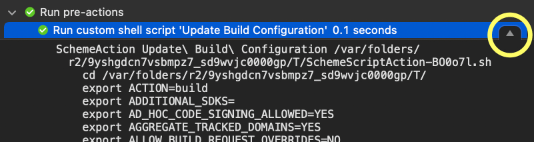
There are many more of these. I would encourage you to look at the build log, find your build script, e.g. for "Pre-actions" at the very top, and make sure to click on the small "details" button that appears on the right when you select your script.
Fastlane Test Failures
Fastlane makes use of the same build scripts since it calls the Xcode build system:
xcodebuild ... build test
However, I recently discovered errors in my post-build script where I was trying to check a file in the app bundle. The file was not found!
This has been working for months in Xcode, so why did it fail when fastlane builds the project?
Well, it turns out, for the first of multiple calls to fastlane's snapshot, I am calling it with:
snapshot(
  clean: true,
  ...
)
…which results in fastlane using this:
xcodebuild ... clean build test
…and (this is the problem:) the "pre-build" and "post-build" action scripts are also called when running "clean" !!!
Obviously, there will be no files in the build folder for my script to find.
No Scripts When Cleaning
Let's make sure our build scripts are only executed for xcodebuild build and not for xcodebuild clean. I am not aware of an Xcode setting to achieve this, but this line at the top of a custom build action script (written for /bin/sh) will do the trick:
# Exit here if called by `xcodebuild clean`
[ $ACTION == "clean" ] && exit 0
P.S. Make sure to enable "provide build settings from