/dev/trouble
Eric Roller's Development Blog

Xcode Upload: Copy Failed

- Posted in Xcode by

Trying to upload an app binary from within Xcode (26.0.1) to Apple's AppStoreConnect, be it either for validation or for distribution, currently fails for me with this error:

Xcode error message: copy failed

This doesn't give a lot of clues, but you can press on "Show Logs" and dig deeper.

In my case, the IDEDistributionPipeline.log file contained these (edited) lines near the bottom:

2025-10-18 13:28:19 +0000  Skipping stripping extended attributes because the codesign step will strip them.
[...]
2025-10-18 13:28:23 +0000  Processing step: IDEDistributionCreateIPAStep
2025-10-18 13:28:23 +0000  Running /usr/bin/rsync '-8aPhhE' [...edited...]
2025-10-18 13:28:23 +0000  rsync: on remote machine: --extended-attributes: unknown option
2025-10-18 13:28:23 +0000  rsync error: syntax or usage error (code 1) at main.c(1455) [server=3.0.9]
2025-10-18 13:28:23 +0000  rsync(34442): error: unexpected end of file
2025-10-18 13:28:23 +0000  /usr/bin/rsync exited with 1
2025-10-18 13:28:23 +0000  Step "<IDEDistributionCreateIPAStep: 0x85f38f2a0>" failed with error "Error Domain=IDEFoundationErrorDomain Code=1 "Copy failed" UserInfo={NSLocalizedDescription=Copy failed}"

So, apparently, the current version of rsync on Apple's server is not a version that supports "extended attributes". Or maybe codesign did not strip the extended attributes as it was told.

Neither is something that I can do much about. Waiting for a fix...

Update 2025-10-19

Apple’s Developer Support for “Binary Delivery and Processing” only offers administrative support and suggests using the forums instead…

Which rsync?

This stackoverflow thread suggests that it might be a wrong local version of rsync, and yes, I have a /usr/local/bin/rsync version that I use for backup scripts; the original /usr/bin/rsync is unchanged:

# rsync --version
rsync  version 3.0.9  protocol version 30
[...]
# /usr/bin/rsync --version
openrsync: protocol version 29
rsync version 2.6.9 compatible

It turns out, if I launch Xcode from the Finder, it works!

But if I launch Xcode via my xcode command-line alias, it inherits my local $PATH settings and uses my custom version of rsync. As a fix, I have updated my alias to cut out all /usr/local paths before opening Xcode:

alias xcode="ls | grep xcodeproj | \
    env PATH=$(echo $PATH|sed 's//usr/local/[^:]*://g') \
    xargs open -a /Applications/Xcode.app"

Xcode Build Script Setup

- Posted in Xcode by

I have been using Xcode "pre-build" and "post-build" action scripts on many occasions but I had not realised that these scripts were the cause of the many test (not build!) failures when running fastlane.

To setup such scripts, choose in Xcode: Product > Schemes > Edit Scheme… then open the small disclosure triangle next to "Build" in the top-left of the scheme editing window. Then select either "Pre-actions" or "Post-actions". On the right, you may now edit or add custom shell scripts.

build pre-action script location

In such a script, when you select "provide build settings from ", you can make use of many build-related variables that Xcode provides. Those that I use most often are:

  • $MARKETING_VERSION - the current app version number.

  • $PROJECT_DIR - path to your root directory;

  • $PROJECT_TEMP_DIR - path to a temporary directory that Xcode uses in the build process;

  • ${TARGET_BUILD_DIR}/${CONTENTS_FOLDER_PATH} - path to the app bundle that was built.

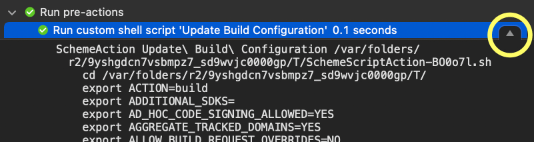
There are many more of these. I would encourage you to look at the build log, find your build script, e.g. for "Pre-actions" at the very top, and make sure to click on the small "details" button that appears on the right when you select your script.

build log with button to reveal details

Fastlane Test Failures

Fastlane makes use of the same build scripts since it calls the Xcode build system:

xcodebuild ... build test

However, I recently discovered errors in my post-build script where I was trying to check a file in the app bundle. The file was not found!

This has been working for months in Xcode, so why did it fail when fastlane builds the project?

Well, it turns out, for the first of multiple calls to fastlane's snapshot, I am calling it with:

snapshot(
  clean: true,
  ...
)

…which results in fastlane using this:

xcodebuild ... clean build test

…and (this is the problem:) the "pre-build" and "post-build" action scripts are also called when running "clean" !!!

Obviously, there will be no files in the build folder for my script to find.

No Scripts When Cleaning

Let's make sure our build scripts are only executed for xcodebuild build and not for xcodebuild clean. I am not aware of an Xcode setting to achieve this, but this line at the top of a custom build action script (written for /bin/sh) will do the trick:

# Exit here if called by `xcodebuild clean`
[ $ACTION == "clean" ] && exit 0

P.S. Make sure to enable "provide build settings from ".

Trying to run fastlane for a watchOS target, I found myself stuck at this error:

[...]
[18:18:04]: ▸ Processing Info.plist
[18:18:08]: ▸ Linking moria.debug.dylib
[18:18:09]: ▸ Linking moria
[18:18:09]: Running Tests: ▸ Touching moria.app (in target 'moria-watchOS' from project 'moria')
[18:18:09]: ▸ Build Succeeded
[18:18:09]: ▸ --- xcodebuild: WARNING: Using the first of multiple matching destinations:
[18:18:09]: ▸ { platform:watchOS Simulator, id:2F3EFDE2-C515-4C2D-8231-20F4250D2B66, OS:11.1, name:Apple Watch Ultra (49mm) }
[18:18:09]: ▸ { platform:watchOS Simulator, id:2F3EFDE2-C515-4C2D-8231-20F4250D2B66, OS:11.1, name:Apple Watch Ultra (49mm) }
[18:18:09]: ▸ 2024-12-05 18:18:09.209 xcodebuild[68726:4065663] Writing error result bundle to /var/folders/p2/km38m51j3mndjw93wypkd3_80000gp/T/ResultBundle_2024-05-12_18-18-0009.xcresult
[18:18:10]: ▸ xcodebuild: error: Failed to build project moria with scheme moria-watchOS.: Could not find test host for Tests-watchOS: TEST_HOST evaluates to "/var/folders/p2/km38m51j3mndjw93wypkd3_80000gp/T/snapshot_derived20241205-68477-ve5y3u/Build/Products/Debug-watchsimulator/moria Watch App.app/moria Watch App"

It could not find the test host?

Searching for the TEST_HOST setting, I can see in the log files, during the execution of one of my pre-build scripts, that there is:

[18:43:45]: ▸     export TEST_FRAMEWORK_SEARCH_PATHS=" /Applications/Xcode.app/Contents/Developer/Platforms/WatchSimulator.platform/Developer/Library/Frameworks watchsimulator11.1/Developer/Library/Frameworks"
[18:43:45]: ▸     export TEST_HOST=
[18:43:45]: ▸     export TEST_LIBRARY_SEARCH_PATHS=" /Applications/Xcode.app/Contents/Developer/Platforms/WatchSimulator.platform/Developer/usr/lib"

So TEST_HOST is "" ??

Well, searching for "TEST_HOST" in Xcode gave no results.

Neither did searching the Internet.

(ONE WEEK LATER)

But my egg search alias found something else. This is a deep directory search in the UNIX shell, opening the matches in an editor. My zsh aliases are:

gf - Grep Files

gf () { find -L . \( -name "*~" -o -name "*.bak" -o -name ".git" \
        -o -name "*.png" \) -prune -o -type f \
        -exec grep -l $* {} ; | sed "s/\\ / /g" }

egg - Edit Grep files in GUI

egg () { gf $* | eval xargs $VISUAL +/$* }

where $VISUAL is the name of your preferred GUI-based text editor; for me that is set to "mvim -f".

Where is the TEST_HOST?

Searching from within the Xcode $PROJECT_DIR:

egg TEST_HOST

Opens the text editor for these files:

./moria.xcodeproj/project.pbxproj
./moria.xcodeproj/project.xcworkspace/xcuserdata/gimli.xcuserdatad/UserInterfaceState.xcuserstate

The second one is binary property list which probably has cached my search string. The first, however, reveals settings like these for the test targets:

TEST_TARGET_NAME = "moria Watch App";

and:

TEST_HOST = "$(BUILT_PRODUCTS_DIR)/moria Watch App.app/$(BUNDLE_EXECUTABLE_FOLDER_PATH)/moria Watch App";

...which were incorrect after I had previously changed the $PRODUCT_NAME for the watchOS target. Sigh. Let's fix this.

  • First of all, don't edit any xcodeproj files while the project is open in Xcode, so cllose the project in Xcode.
  • Correct the names in your text editor such that the settings for the test targets match the $PRODUCT_NAME of the watchOS target.
  • Then open the project again in Xcode.

Example updates:

TEST_TARGET_NAME = "moria";

and:

TEST_HOST = "$(BUILT_PRODUCTS_DIR)/moria.app/$(BUNDLE_EXECUTABLE_FOLDER_PATH)/moria";

Now fastlane works.

Xcode build numbering update

- Posted in Xcode by

Up until today, I have been using a Build Phase script to update the CFBundleVersion in the Info.plist file using a script like this:

#!/bin/bash

if [[ ! -d .git ]]; then
  echo "Error: Git setup not found: ./.git"
  exit 1
fi

# The number of commits in the master branch.
rev=$(expr $(git rev-list master --count) - $(git rev-list HEAD..master --count))

echo "Updating build number to $rev:"

for plist in 
    "${TARGET_BUILD_DIR}/${INFOPLIST_PATH}" 
    ; do
  if [ -f "$plist" ]; then
    echo " -> $(file "$plist")"
    /usr/libexec/PlistBuddy -c "Set :CFBundleVersion $rev" "$plist"
    plutil -lint -s "$plist"
  else
    echo " ?? $plist"
  fi
done

Sadly, with Xcode 15, this stopped working. Whether or not ENABLE_USER_SCRIPT_SANDBOXING was enabled or not, Xcode no longer allowed access to the plist file (or complained about a circular dependency).

So, now I am using a build configuration file to set the build number; the config file needs to be added to the Xcode project, and selected in the project "Configurations". My file contains just:

// proj.xcconfig
CURRENT_PROJECT_VERSION = 0

Also, the Info.plist file needs to be updated to use:

<key>CFBundleVersion</key>
<string>$(CURRENT_PROJECT_VERSION)</string>

My new methodology uses a "Build pre-actions" script (added in the target's scheme editor and using the build settings from the target) to update the .xcconfig file before every build:

#!/bin/bash
cd "$SOURCE_ROOT"

if [[ ! -d .git ]]; then
  echo "Error: Git setup not found: ./.git"
  exit 1
fi

# The number of commits in the master branch.
rev=$(expr $(git rev-list master --count) - $(git rev-list HEAD..master --count))

echo "Updating build number to $rev:"

sed -i '' "/CURRENT_PROJECT_VERSION/ { s/=.*/= $rev/; }" ./*.xcconfig

But since the .xcconfig file is also a revision-controlled file, I reset the value again in a "Build post-actions" script. Similar to using git restore to revert the changes:

#!/bin/bash
cd "$SOURCE_ROOT"
sed -i '' '/CURRENT_PROJECT_VERSION/ { s/=.*/= 0/; }' ./*.xcconfig

Explanation of the sed code:

  • For any file matching *.xcconfig,
  • modify it "in place" (not creating a backup file),
  • all lines containing "CURRENT_PROJECT_VERSION",
  • substitute text beginnig with "=" to "= $rev" or "= 0".

Update 2024-01-11

Finally, I added a build configuration script to make sure that the $(CURRENT_PROJECT_VERSION) variable contains a non-zero value:

#!/bin/sh
ok=0
if [ ${CURRENT_PROJECT_VERSION:-0} -eq 0 ]; then
  echo 'Error: CURRENT_PROJECT_VERSION has not been set.'
  ok=1
fi
exit $ok

Update 2025-01-01

The script has evolved further. I am no longer re-setting the values in the .xcconfig file since Xcode is very sensitive to any changes to the file, particularly when working with SwiftUI previews. The new approach is as follows; this is one scheme pre-build script, shown here in sections:

To begin with, some setup and checks that a git repo is present and that Xcode is calling the script:

cd "$PROJECT_DIR"

# The default branch, if not supplied as an argument, is 'master'.
branch=${1:-'master'}
year=$(date +%Y)

if [ ! -d ./.git ]; then
  echo "Error: Git setup not found: $(pwd)/.git" >&2
  exit 1
fi

if [ -z "${MARKETING_VERSION:-}" ]; then
  echo 'Error: MARKETING_VERSION has not been set.' >&2
  exit 1
fi

The build number is worked out as the number of commits:

# The number of commits in the branch, less the number of commits
# behind in that branch.
rev=$(expr $(git rev-list $branch --count) - $(git rev-list HEAD..$branch --count))

if [ -z "$rev" ]; then
  echo 'Error: Unable to work out commit count.' >&2
  exit 1
fi

echo "Updating build number to $rev using branch '$branch':"

To avoid changing the local file, we create a copy in this temporary directory, creating it if missing:

[ -d "$CONFIGURATION_TEMP_DIR" ] || mkdir -p "$CONFIGURATION_TEMP_DIR"

I have moved the input .xcconfig template files in a ./Config directory, which will be modified and a copy is created in the local directory. Also, I have renamed my variables to TREDJE_BUILD_NUMBER and TREDJE_YEAR.

Two important points:

  • The script creates a copy in a temporary directory and only overwrites the local file if they are different. Keeping the local file untouched in this way avoids repeated re-builds for SwiftUI previews.

  • While I have checked in a basic version of the .xcconfig file, I never want to check in the modified version. This is achieved by instructing git to ignore the local file change.

This is done here:

for file in ./Config/*.xcconfig ; do
  fout=${file#*Config/}
  name=${file##*/}
  [ ! -f "$file" ] && echo " ?? $file" && continue
  [ ! -f "$fout" ] && echo " ?? $fout" && continue

  # Put the up-to-date data in a temporary file.
  sed "/TREDJE_BUILD_NUMBER/ s/=.*/= $rev/; /TREDJE_YEAR/ s/=.*/= $year/;" "$file" > "$CONFIGURATION_TEMP_DIR/$name"

  # Skip changing the file if identical to the temp file.
  $(cmp -s "$fout" "$CONFIGURATION_TEMP_DIR/$name") && continue

  echo " -> $fout"
  mv "$CONFIGURATION_TEMP_DIR/$name" "$fout"
  git update-index --assume-unchanged "$fout"
done

Finally, I do a similar change for a settings bundle Plist file:

echo "Updating YEAR to $year and VERSION_STRING to $MARKETING_VERSION ($rev):"

for file in 
        ./Config/iOS/Settings.bundle/Root.plist 
    ; do
  fout=${file#*Config/}
  name=${file##*/}
  [ ! -f "$file" ] && echo " ?? $file" && continue
  [ ! -f "$fout" ] && echo " ?? $fout" && continue

  sed "s/TREDJE_VERSION_STRING/$MARKETING_VERSION ($rev)/; s/TREDJE_YEAR/$year/;" "$file" > "$CONFIGURATION_TEMP_DIR/$name"

  # Skip changing the file if identical to the temp file.
  $(cmp -s "$fout" "$CONFIGURATION_TEMP_DIR/$name") && continue

  echo " -> $(file "$fout")"
  mv "$CONFIGURATION_TEMP_DIR/$name" "$fout"
  plutil -lint -s "$fout"
  git update-index --assume-unchanged "$fout"
done

Framing iPhone 14 screenshots

- Posted in iOS by

When trying to place generated screenshots into device frames (automated by fastlane's frameit), I discovered that, since the iPhone 14 devices have small bezels, the corners of the screenshot can be seen spilling over to outside of the template frames for these devices:

trim_devices = [
    "iPhone 14 Plus",
    "iPhone 14 Pro",
    "iPhone 14 Pro Max",
]

I solved this by cutting the corners off of the screenshot images before running frameit. This can be done by three ImageMagick commands, creating a rounded-rect image with 50-pixel-radius curved corners:

`convert '#{file}' 
    -format 'roundrectangle 1,1 %[fx:w+4],%[fx:h+4] 50,50' 
    info: > mask.mvg`
`convert '#{file}' 
    -alpha transparent 
    -background none 
    -fill white 
    -stroke none 
    -strokewidth 0 
    -draw "@mask.mvg" mask.png`
`convert '#{file}' 
    -alpha set 
    -bordercolor none 
    mask.png 
    -compose DstIn 
    -composite '#{file_name}'`

In my setup, I am operating in a temporary directory (with a language subdirectory, e.g. "en-US"):

Dir.mktmpdir do |tmp|
  path_temp = File.join(tmp, language)
  Dir.mkdir(path_temp)
  puts "Operating in #{path_temp}"

  num_found = 0
  # ...(see below)...
end

Then for each of the devices, depending on whether it is a large iPhone 14 device or not, I either create a corner-cropped image in the temporary directory or place a copy of - or rather a symbolic link to - the original image:

path_shot = File.absolute_path(File.join(
      "..", output_directory, language
  ))

run_devices.each do |device|
  Dir.glob(File.join(path_shot, device + "-*.png")).each do |file|
    file_name = File.basename(file)
    Dir.chdir(path_temp) do
      if trim_devices.include? device
        # Cut off rounded corners using ImageMagick:
        puts "Rounded frame for: #{file_name}"
        `convert '#{file}' -format 'roundrectangle 1,1 %[fx:w+4],%[fx:h+4] 50,50' info: > mask.mvg`
        `convert '#{file}' -alpha transparent -background none -fill white -stroke none -strokewidth 0 -draw "@mask.mvg" mask.png`
        `convert '#{file}' -alpha set -bordercolor none mask.png -compose DstIn -composite '#{file_name}'`
        Dir.glob("mask.*").each { |mask| File.delete(mask) }
      else
        puts "Linking frame for: #{file_name}"
        File.symlink(file, file_name)
      end
    end
    num_found += 1
  end
end

After adding Framefile.json as well as any other needed files into the temporary directory, frameit can be called to do its work there:

frame_screenshots(
    use_platform: "IOS",
    path: tmp
)

Thereafter the "*_framed.png" images need to be copied before the temporary directory is deleted. Here is an example where the result frames are placed in a separate "en-US_framed" directory:

path_fram = File.absolute_path(File.join(
    "..", output_directory, language + "_framed"
))

Dir.glob(File.join(path_temp, "*_framed.png")).each do |file|
  file_name = File.basename(file).sub(/_framed/, "")
  puts "Frame generated: #{file_name}"
  FileUtils.cp(file, File.join(path_fram, file_name))
end

In my setup, fastlane usually runs on a separate computer in my closet. Therefore I find it helpful to add audio messages such that I can hear the status:

sh 'say "Creating screenshots for iOS devices."'

Fastlane's say() command sometimes hasn't worked for me. That's why I have used sh 'say'. However, that was recorded by fastlane as an action. Using this Ruby syntax is not tracked as an action:

`say "Processing images."`

But neither does its produce any text in the log. So I created this Ruby function which prints the message and then speaks it:

def talk(s) puts s; `say "#{s}"` end

With the function anywhere in fastlanes Fastfile, one can just call it like a command:

talk "Framing screenshots"

Speaking Multiple Phrases

This all works nicely, but I discovered that my error message needs to be made more prominent. I might be in the bathroom and don't hear the announcement. That's why I have now changed it to be a lot longer and a lot more annoying.

error do |lane, exception|
  phrases = [
      "Are you serious?",
      "Huston, we've had a problem!",
      "I can't believe it!",
      "I thought you had fixed that.",
      "Is it broken again?",
      "Maybe we can just reboot it?",
      "No! No! No, not again!",
      "Oops! I did it again!",
      "Something smells fishy!",
      "There is a left-over screw here.",
      "There must be a rational explanation for this.",
      "This must be a mistake!",
      "What if we pressed the red button?",
      "What is going on?",
      "What is this switch for?",
      "Where's the beef?",
      "Where is the user manual?",
      "Who pressed the red button?",
      "Who let the dogs out?",
      "You must be joking!",
  ]

  `say "#{ phrases.shuffle.join(" [[slnc 2500]] ") }"`
end

Note that the phrases are shuffled and concatenated by [[sinc 2500]] instructions which add 2.5-second-long pauses between the phrases. I found that in Apple's Speech Synthesis Programming Guide.

Whenever I like to show or hide view elements, I stumble over the hidden() view property:

struct MyView: View {
    var body: some View {
        Text("Visible")

        Text("Not visible")
            .hidden()
    }
}

What perplexes me is why anyone would need this? If it is always hidden, then why add it in the first place??

Well, I guess it could be used to create some well-defined, empty space in the view layout.

Now, this is what I would really have a use for:

struct MyView: View {
    var show_info: Bool

    var body: some View {
        Text("Visible")

        Text("Sometimes visible")
            .hide(!show_info)    // OBS! Doesn't exist!
    }
}

Depending on whether or not the hidden part should be used when laying out the view, a different approach is needed. Either without taking any space:

struct MyView: View {
    var show_info: Bool

    var body: some View {
        Text("Visible")

        if show_info {
            // Not occupying space when hidden
            Text("Sometimes visible")
        }
    }
}

Or occupying space:

struct MyView: View {
    var show_info: Bool

    var body: some View {
        Text("Visible")

        // Taking space, even if transparent
        Text("Sometimes visible")
            .opacity(show_info ? 1.0 : 0.0)
    }
}

Creating screenshots is a tedious task that lends itself to automation. Ideally, it would be preferrable if it were possible to have simple, device-idependent testing scripts. The reality is that many exceptions creep into the code that simulates the UI interactions when generating the screenshots:

if UIDevice.current.userInterfaceIdiom == .phone {
    // Do something different for iPhones.
}

But the real problem is maintaining these scripts. Whether it is iOS SDK changes, new device names, new screen sizes, or indeed new apps features, suddenly the scripts no longer work. Even if everything worked nicely last time, the tiniest of changes will trigger hours of UI scripts re-tuning.

I usually find myself having to re-run fastlane over and over in order to create new screen shots. Quite often, the scripts work well for some devices but fail for others. At that point it would be nice if fastlane could be instructed to only re-run the scripts for the devices that had failed. But fastlane has no option for that.

But it is possible to re-code the Fastfile since it is essentially a Ruby script. All I need is a simple check whether the final screenshot exists for a device. When present, don't re-run the lengthy UI scripts for that device.

So here are the relevant parts of my new ./fastlane/Fastfile; beware custom names like MyApp:

delete_all_screenshots = false

swift_macro_defs =
    "SWIFT_ACTIVE_COMPILATION_CONDITIONS='FASTLANE'"
output_directory = "./screenshots/fastlane"

# All languages and devices to run:
all_languages = [ "en-us" ]

all_devices = [
    "iPad Pro (9.7-inch)",
    "iPad Pro (10.5-inch)",
##  "iPad Pro (11-inch)",
    "iPad Pro (11-inch) (4th generation)",
    "iPad Pro (12.9-inch) (2nd generation)",
    "iPad Pro (12.9-inch) (6th generation)",
    "iPhone 8",
    "iPhone 8 Plus",
    "iPhone 14",
    "iPhone 14 Plus",
    "iPhone 14 Pro",
    "iPhone 14 Pro Max",
    "Apple TV",
    "Apple TV 4K (3rd generation)",
]

platform ::ios do
  desc "Take screenshots (iOS)"
  lane :ios_screenshot do

    all_languages.each do |language|
      # Work out the path to the screenshots.
      # Beware: CWD is the directory of this file!
      path_shot = File.join(
          "..", output_directory, language
      )

      run_devices = Array.new

      all_devices.each do |device|
        # Neither 'Apple TV' nor 'Apple Watch' devices
        next if device.start_with? "Apple"

        unless delete_all_screenshots then
          # If the last screenshot exists, skip this device:
          last_shot = device + "-10_Exercises.lite.png"
          last_shot = device + "-09_Exercises.lite.png" \
              if device.start_with? "iPad"

##        puts "Checking if file exists: #{last_shot}"
          file_shot = File.join(path_shot, last_shot)
          next if File.exists?(file_shot)
        end

        run_devices << device
      end

      next if run_devices.empty?

      snapshot(
          project: "./MyApp.xcodeproj",
          scheme: "MyApp-iOS",
          xcargs: swift_macro_defs,
          devices: run_devices,
          languages: [ language ],
          localize_simulator: true,
          reinstall_app: true,
          headless: false,
          concurrent_simulators: false,
          clean: delete_all_screenshots,
          clear_previous_screenshots:
              delete_all_screenshots,
          stop_after_first_error: true,
          number_of_retries: 0,
          override_status_bar: true,
          test_without_building: false,
          output_directory: output_directory,
          disable_slide_to_type: true,
          skip_open_summary: true,
          only_testing: [
              "UITests-iOD/UITests_Fastlane",
          ],
      )

      delete_all_screenshots = false
    end
  end
end

If you want to recreate all screenshots, you could set delete_all_screenshots to true or, well, delete the files manually.

Also note the SWIFT_ACTIVE_COMPILATION_CONDITIONS compiler flag. This allows me to define a FASTLANE macro that can be used in the app's Swift code:

#if FASTLANE
loadExampleData()
#endif

Time Machine can be configured to exclude folders from your backups (see System Settings > General > Time Machine > Options). I usually exclude these:

  • /Library/Caches
  • ~/Library/Caches
  • ~/Library/Developer/CoreSimulator
  • ~/Library/Developer/XCPGDevices
  • ~/Library/Developer/XCTestDevices
  • ~/Library/Developer/Xcode/DerivedData
  • ~/Library/Developer/Xcode/DocumentationCache
  • ~/Library/Developer/Xcode/iOS DeviceSupport
  • ~/Library/Developer/Xcode/tvOS DeviceSupport
  • ~/Library/Developer/Xcode/watchOS DeviceSupport
  • ~/Library/Logs/CoreSimulator

Also, if you need to make space to be able to install Xcode or a macOS update, you can delete the contents of the above folders (assuming you no longer need old device SDKs).

When the NumberFormatter() is asked to output Decimal/NSDecimalNumber values with more than 15 fractional digits, the output is rounded (apparently to the precision of Double numbers). Example:

14 decimals: 3.14159265358979
15 decimals: 3.141592653589793
16 decimals: 3.1415926535897900
17 decimals: 3.14159265358979000
18 decimals: 3.141592653589790000
19 decimals: 3.1415926535897900000
20 decimals: 3.14159265358979000000

Note the trailing zeros which are not expected.

Note that Decimal numbers support a precision of 38-decimals. Example: Decimal.pi.description

3.14159265358979323846264338327950288419

Code to reproduce the rounding problem:

import Foundation

var number = Decimal.pi
let formatter = NumberFormatter()

for width in 10 ... 38 {
    formatter.maximumFractionDigits = width
    formatter.minimumFractionDigits = width
    print(String(width) + " decimals: " +
            (formatter.string(from: number as NSDecimalNumber) ?? ""))
}

Apple feedback ID: FB9835108