/dev/trouble
Eric Roller's Development Blog

Xcode

Stuff closely related to Apple's development IDE.

Xcode Upload: Copy Failed

- Posted in Xcode by

Trying to upload an app binary from within Xcode (26.0.1) to Apple's AppStoreConnect, be it either for validation or for distribution, currently fails for me with this error:

Xcode error message: copy failed

This doesn't give a lot of clues, but you can press on "Show Logs" and dig deeper.

In my case, the IDEDistributionPipeline.log file contained these (edited) lines near the bottom:

2025-10-18 13:28:19 +0000  Skipping stripping extended attributes because the codesign step will strip them.
[...]
2025-10-18 13:28:23 +0000  Processing step: IDEDistributionCreateIPAStep
2025-10-18 13:28:23 +0000  Running /usr/bin/rsync '-8aPhhE' [...edited...]
2025-10-18 13:28:23 +0000  rsync: on remote machine: --extended-attributes: unknown option
2025-10-18 13:28:23 +0000  rsync error: syntax or usage error (code 1) at main.c(1455) [server=3.0.9]
2025-10-18 13:28:23 +0000  rsync(34442): error: unexpected end of file
2025-10-18 13:28:23 +0000  /usr/bin/rsync exited with 1
2025-10-18 13:28:23 +0000  Step "<IDEDistributionCreateIPAStep: 0x85f38f2a0>" failed with error "Error Domain=IDEFoundationErrorDomain Code=1 "Copy failed" UserInfo={NSLocalizedDescription=Copy failed}"

So, apparently, the current version of rsync on Apple's server is not a version that supports "extended attributes". Or maybe codesign did not strip the extended attributes as it was told.

Neither is something that I can do much about. Waiting for a fix...

Update 2025-10-19

Apple’s Developer Support for “Binary Delivery and Processing” only offers administrative support and suggests using the forums instead…

Which rsync?

This stackoverflow thread suggests that it might be a wrong local version of rsync, and yes, I have a /usr/local/bin/rsync version that I use for backup scripts; the original /usr/bin/rsync is unchanged:

# rsync --version
rsync  version 3.0.9  protocol version 30
[...]
# /usr/bin/rsync --version
openrsync: protocol version 29
rsync version 2.6.9 compatible

It turns out, if I launch Xcode from the Finder, it works!

But if I launch Xcode via my xcode command-line alias, it inherits my local $PATH settings and uses my custom version of rsync. As a fix, I have updated my alias to cut out all /usr/local paths before opening Xcode:

alias xcode="ls | grep xcodeproj | \
    env PATH=$(echo $PATH|sed 's//usr/local/[^:]*://g') \
    xargs open -a /Applications/Xcode.app"

Xcode Build Script Setup

- Posted in Xcode by

I have been using Xcode "pre-build" and "post-build" action scripts on many occasions but I had not realised that these scripts were the cause of the many test (not build!) failures when running fastlane.

To setup such scripts, choose in Xcode: Product > Schemes > Edit Scheme… then open the small disclosure triangle next to "Build" in the top-left of the scheme editing window. Then select either "Pre-actions" or "Post-actions". On the right, you may now edit or add custom shell scripts.

build pre-action script location

In such a script, when you select "provide build settings from ", you can make use of many build-related variables that Xcode provides. Those that I use most often are:

  • $MARKETING_VERSION - the current app version number.

  • $PROJECT_DIR - path to your root directory;

  • $PROJECT_TEMP_DIR - path to a temporary directory that Xcode uses in the build process;

  • ${TARGET_BUILD_DIR}/${CONTENTS_FOLDER_PATH} - path to the app bundle that was built.

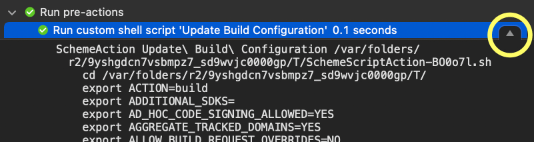
There are many more of these. I would encourage you to look at the build log, find your build script, e.g. for "Pre-actions" at the very top, and make sure to click on the small "details" button that appears on the right when you select your script.

build log with button to reveal details

Fastlane Test Failures

Fastlane makes use of the same build scripts since it calls the Xcode build system:

xcodebuild ... build test

However, I recently discovered errors in my post-build script where I was trying to check a file in the app bundle. The file was not found!

This has been working for months in Xcode, so why did it fail when fastlane builds the project?

Well, it turns out, for the first of multiple calls to fastlane's snapshot, I am calling it with:

snapshot(
  clean: true,
  ...
)

…which results in fastlane using this:

xcodebuild ... clean build test

…and (this is the problem:) the "pre-build" and "post-build" action scripts are also called when running "clean" !!!

Obviously, there will be no files in the build folder for my script to find.

No Scripts When Cleaning

Let's make sure our build scripts are only executed for xcodebuild build and not for xcodebuild clean. I am not aware of an Xcode setting to achieve this, but this line at the top of a custom build action script (written for /bin/sh) will do the trick:

# Exit here if called by `xcodebuild clean`
[ $ACTION == "clean" ] && exit 0

P.S. Make sure to enable "provide build settings from ".

Xcode build numbering update

- Posted in Xcode by

Up until today, I have been using a Build Phase script to update the CFBundleVersion in the Info.plist file using a script like this:

#!/bin/bash

if [[ ! -d .git ]]; then
  echo "Error: Git setup not found: ./.git"
  exit 1
fi

# The number of commits in the master branch.
rev=$(expr $(git rev-list master --count) - $(git rev-list HEAD..master --count))

echo "Updating build number to $rev:"

for plist in 
    "${TARGET_BUILD_DIR}/${INFOPLIST_PATH}" 
    ; do
  if [ -f "$plist" ]; then
    echo " -> $(file "$plist")"
    /usr/libexec/PlistBuddy -c "Set :CFBundleVersion $rev" "$plist"
    plutil -lint -s "$plist"
  else
    echo " ?? $plist"
  fi
done

Sadly, with Xcode 15, this stopped working. Whether or not ENABLE_USER_SCRIPT_SANDBOXING was enabled or not, Xcode no longer allowed access to the plist file (or complained about a circular dependency).

So, now I am using a build configuration file to set the build number; the config file needs to be added to the Xcode project, and selected in the project "Configurations". My file contains just:

// proj.xcconfig
CURRENT_PROJECT_VERSION = 0

Also, the Info.plist file needs to be updated to use:

<key>CFBundleVersion</key>
<string>$(CURRENT_PROJECT_VERSION)</string>

My new methodology uses a "Build pre-actions" script (added in the target's scheme editor and using the build settings from the target) to update the .xcconfig file before every build:

#!/bin/bash
cd "$SOURCE_ROOT"

if [[ ! -d .git ]]; then
  echo "Error: Git setup not found: ./.git"
  exit 1
fi

# The number of commits in the master branch.
rev=$(expr $(git rev-list master --count) - $(git rev-list HEAD..master --count))

echo "Updating build number to $rev:"

sed -i '' "/CURRENT_PROJECT_VERSION/ { s/=.*/= $rev/; }" ./*.xcconfig

But since the .xcconfig file is also a revision-controlled file, I reset the value again in a "Build post-actions" script. Similar to using git restore to revert the changes:

#!/bin/bash
cd "$SOURCE_ROOT"
sed -i '' '/CURRENT_PROJECT_VERSION/ { s/=.*/= 0/; }' ./*.xcconfig

Explanation of the sed code:

  • For any file matching *.xcconfig,
  • modify it "in place" (not creating a backup file),
  • all lines containing "CURRENT_PROJECT_VERSION",
  • substitute text beginnig with "=" to "= $rev" or "= 0".

Update 2024-01-11

Finally, I added a build configuration script to make sure that the $(CURRENT_PROJECT_VERSION) variable contains a non-zero value:

#!/bin/sh
ok=0
if [ ${CURRENT_PROJECT_VERSION:-0} -eq 0 ]; then
  echo 'Error: CURRENT_PROJECT_VERSION has not been set.'
  ok=1
fi
exit $ok

Update 2025-01-01

The script has evolved further. I am no longer re-setting the values in the .xcconfig file since Xcode is very sensitive to any changes to the file, particularly when working with SwiftUI previews. The new approach is as follows; this is one scheme pre-build script, shown here in sections:

To begin with, some setup and checks that a git repo is present and that Xcode is calling the script:

cd "$PROJECT_DIR"

# The default branch, if not supplied as an argument, is 'master'.
branch=${1:-'master'}
year=$(date +%Y)

if [ ! -d ./.git ]; then
  echo "Error: Git setup not found: $(pwd)/.git" >&2
  exit 1
fi

if [ -z "${MARKETING_VERSION:-}" ]; then
  echo 'Error: MARKETING_VERSION has not been set.' >&2
  exit 1
fi

The build number is worked out as the number of commits:

# The number of commits in the branch, less the number of commits
# behind in that branch.
rev=$(expr $(git rev-list $branch --count) - $(git rev-list HEAD..$branch --count))

if [ -z "$rev" ]; then
  echo 'Error: Unable to work out commit count.' >&2
  exit 1
fi

echo "Updating build number to $rev using branch '$branch':"

To avoid changing the local file, we create a copy in this temporary directory, creating it if missing:

[ -d "$CONFIGURATION_TEMP_DIR" ] || mkdir -p "$CONFIGURATION_TEMP_DIR"

I have moved the input .xcconfig template files in a ./Config directory, which will be modified and a copy is created in the local directory. Also, I have renamed my variables to TREDJE_BUILD_NUMBER and TREDJE_YEAR.

Two important points:

  • The script creates a copy in a temporary directory and only overwrites the local file if they are different. Keeping the local file untouched in this way avoids repeated re-builds for SwiftUI previews.

  • While I have checked in a basic version of the .xcconfig file, I never want to check in the modified version. This is achieved by instructing git to ignore the local file change.

This is done here:

for file in ./Config/*.xcconfig ; do
  fout=${file#*Config/}
  name=${file##*/}
  [ ! -f "$file" ] && echo " ?? $file" && continue
  [ ! -f "$fout" ] && echo " ?? $fout" && continue

  # Put the up-to-date data in a temporary file.
  sed "/TREDJE_BUILD_NUMBER/ s/=.*/= $rev/; /TREDJE_YEAR/ s/=.*/= $year/;" "$file" > "$CONFIGURATION_TEMP_DIR/$name"

  # Skip changing the file if identical to the temp file.
  $(cmp -s "$fout" "$CONFIGURATION_TEMP_DIR/$name") && continue

  echo " -> $fout"
  mv "$CONFIGURATION_TEMP_DIR/$name" "$fout"
  git update-index --assume-unchanged "$fout"
done

Finally, I do a similar change for a settings bundle Plist file:

echo "Updating YEAR to $year and VERSION_STRING to $MARKETING_VERSION ($rev):"

for file in 
        ./Config/iOS/Settings.bundle/Root.plist 
    ; do
  fout=${file#*Config/}
  name=${file##*/}
  [ ! -f "$file" ] && echo " ?? $file" && continue
  [ ! -f "$fout" ] && echo " ?? $fout" && continue

  sed "s/TREDJE_VERSION_STRING/$MARKETING_VERSION ($rev)/; s/TREDJE_YEAR/$year/;" "$file" > "$CONFIGURATION_TEMP_DIR/$name"

  # Skip changing the file if identical to the temp file.
  $(cmp -s "$fout" "$CONFIGURATION_TEMP_DIR/$name") && continue

  echo " -> $(file "$fout")"
  mv "$CONFIGURATION_TEMP_DIR/$name" "$fout"
  plutil -lint -s "$fout"
  git update-index --assume-unchanged "$fout"
done

Open Xcode from the Terminal

- Posted in Xcode by

Quite often I find myself in the Terminal and want to open Xcode with the project in the current directory:

% open CurrentProject.xcodeproj

This works just fine, of course, but with the following alias (added to ~/.cshrc), I don't need to know the name of the project, assuming there is always only one project in the current directory:

% alias xcode 'ls | grep xcodeproj | xargs open'
% xcode

N.B. The use of ls ignores the alias that I have for 'ls'. Instead of ls *.xcodeproj, the pipe via grep avoids errors like "ls: No match.".

P.S. Knowing the name of the project is actually not the problem; since there are multiple items named "Current" or "CurrentProject" in the same folder, the issue is that I can't just type open SHIFT+C<TAB><CR> (where pressing TAB autocompletes the name); instead, I have to type: open SHIFT+C<TAB>SHIFT+P<TAB>.x<TAB><CR>.

Update

The Xcode text editor invocation tool xed can achieve much the same thing; just type:

% xed .

This is what I now use to auto-generate the default Main.strings file for my "Base"-localized storyboard.

Basically, whenever the storyboard file is updated, I re-generate the strings file. Most of the time, the resulting strings file doesn't change, but when it does, I use Xcode's version editor to highlight the changes since my last (version control) check-in. I can then make the appropriate changes to the other strings files for all the languages that the project supports.

Here is the build-phase script to Xcode: [more]

Xcode : (Project Navigator) : (Select your Project) : (Select your Target) : Build Phases : ("+" Button) : New Run Script Phase

Change the title to: Re-generate Storyboard Strings File

Shell: /bin/bash

#!/bin/bash
cd ${PROJECT_DIR}

nib_in=${SRCROOT}/Path/Base.lproj/Main.storyboard
str_out=${SRCROOT}/Path/en.lproj/Main.strings

# If the strings file is missing or empty, or
# if the storyboard is more recent:
if [[ ! -n $str_out || $nib_in -nt $str_out ]]; then
  echo "Re-generating: $str_out"
  ibtool --export-strings-file $str_out $nib_in
fi

[On] Show environment variables in build log [Off] Run script only when installing

Input Files ${SRCROOT}/Path/Base.lproj/Main.storyboard

Output Files ${SRCROOT}/Path/en.lproj/Main.strings

I have a XCTestCase scenario using the following methodology:

- (void)testScript {
    NSError* error = nil;
    for (NSURL *scriptURL in [self findScriptFiles]) {

        // Read the entire file.
        NSString *text = [NSString stringWithContentsOfURL:scriptURL
                encoding:NSUTF8StringEncoding error:&error];

        // Test each line.
        [text enumerateLinesUsingBlock:^(NSString *line, BOOL *stop) {

            XCTAssertTrue([self runInstruction:line]);
        }];
    }
}

This works, but I don't like it that all error messages are placed in the testScript source code, whereas they should really be placed inline in the parsed script.

I did a bit of digging in the XCTestCase framework headers and found the solution, using recordFailureWithDescription:inFile:atLine:expected:

- (void)testScript {
    NSError* error = nil;
    for (NSURL *scriptURL in [self findScriptFiles]) {

        // Read the entire file.
        NSString *text = [NSString stringWithContentsOfURL:scriptURL
                encoding:NSUTF8StringEncoding error:&error];
        __block NSUInteger lineNum = 0;

        // Test each line.
        [text enumerateLinesUsingBlock:^(NSString *line, BOOL *stop) {

            lineNum++;

            if ([self runInstruction:line] == NO) {
                // Place the error marker in the parsed file!
                [self recordFailureWithDescription:@"Instruction failed"
                        inFile:[self sourcePathForURL:scriptURL]
                        atLine:lineNum
                        expected:YES];
            }
        }];
    }
}

NB. The scriptURL points to a file within the resources folder of the test target, i.e. not to the original script file in my Xcode project. I therefore need to locate the original script file, for instance relative to the current source file (whose name can be obtained through the __FILE__ preprocessor macro).

Trying to update Xcode 4.0.1 from within the Mac AppStore application, I was greeted with this error message:

You have updates available for other accounts Sign in to (null) to update applications for that account.

There exist numerous forum entries on Apple's discussion board on that subject and the recommended solution is to trash the "Install Xcode" application and then to re-launch the AppStore, selecting to re-install Xcode.

I trashed "Install Xcode" but AppStore produced the same message. Relaunched one additional time and it allowed me to update (note: not install). However, when it was finished, there was no new "Install Xcode" in the Applications folder!

It turns out, the AppStore had located and updated a different copy of the software on a separate drive where I had made a backup, even though I had renamed it to "Install Xcode-4.0.1". Its info window revealed that it had been modified and that its version number now was 4.0.2.

Installation from that modified backup worked correctly.

The old backup could be restored from the version that I had put into the trash.

Searched for it online and found this solution, which worked fine for me (Xcode 3.0):

defaults write com.apple.xcode  PBXCustomTemplateMacroDefinitions  
        '{ ORGANIZATIONNAME = "tredje design"; }'